Rowdy
An iOS keyboard with Android's layout, for people who switched phones.
Side project · Designer and developer · August 20, 2026 · 1 min read
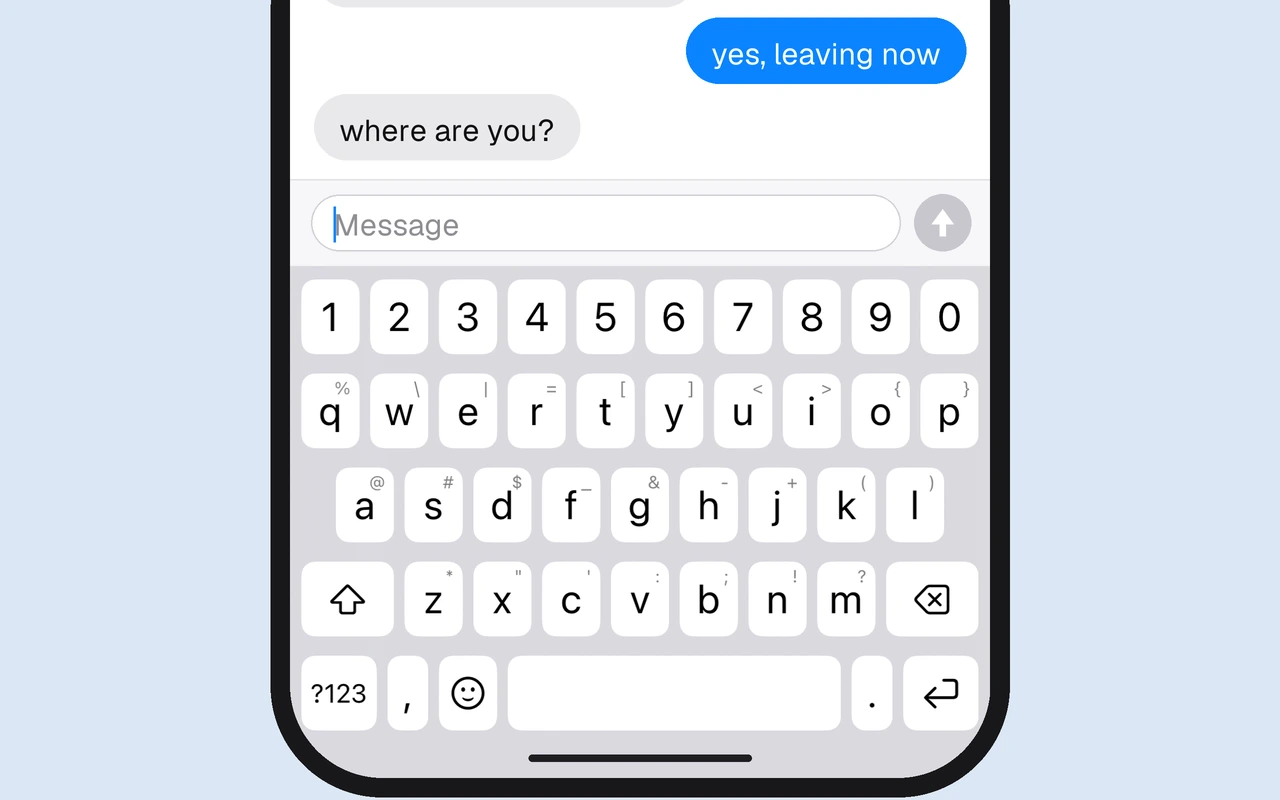
Rowdy is an iOS keyboard with Android's layout, for people who switched from Android to iPhone and lost their typing speed. It keeps the look of the iOS 26 keyboard and changes where things are.
Why I built it
I moved from Android to iPhone and my typing fell apart. The iOS keyboard isn't bad. It's a different shape, and my hands had years of practice on Gboard. On iOS a digit takes three taps, and @ is a page change instead of a long press. When the skill is muscle memory, different is expensive.
What it does
- A number row, always visible. Digits sit above the letters, like on Gboard.
- Symbols on a long press. 26 symbols, one per letter, printed in the corner of each key so you learn them by looking.
- The rest of a full keyboard. Two more symbol pages, an emoji picker with nine categories, a three-state shift, and a backspace that speeds up from characters to whole words.
- Feels like the system keyboard. A balloon over the pressed key, the system click, a haptic tick, and light and dark mode.
Design choices
- Every point belongs to a key. The gaps between keys, about a third of the surface, are split between their neighbours, so a press between two keys still lands on one.
- Hit testing follows your aim. Rowdy watches where presses land relative to the key centres and shifts its targets, because your thumb drifts with how you hold the phone.
- UIKit keys, for latency. The first version drew the keys in SwiftUI, and it felt laggy. I moved every keycap and touch to UIKit. SwiftUI is left only where speed doesn't matter, like the emoji grid.
- No autocorrect, on purpose. It types exactly what you press. It asks for Full Access only for haptics and has no network code, so keystrokes stay on the phone.
Built in Swift for iOS 26. The source is on GitHub, with a script that installs it on your own iPhone.